


Being a successful content creator often seems like the hardest job due to day-by-day increasing competition. Even after putting hours of effort into your content, why does it still fail to go viral? The reason is simple. That is, content doesn’t need hours of effort to go viral and bring profits.
Instead, content needs creativity, value, and engagement to generate the desired results. A creative suite by CapCut is a blessing for all these content creators who struggle through their content.
It is because this Creative Suite helps them edit their photos and videos online with AI tools for free. Its online photo and video editors are the most reliable ones to get 100% interactive and eye-catching results.
Besides, it gives you several free personal and commercial templates to make your videos/photos go viral. The best thing is that it is free and does not even leave any watermark on your content upon downloading.
You must be curious to know more about this mind-blowing edit. So, let’s go through this article to gain more insights into this incredible tool for you.
The Best Creative Suite For Content Creators
Here are some of the most compelling reasons why it is the best Creative Suite for content creators. Let’s look at these reasons.
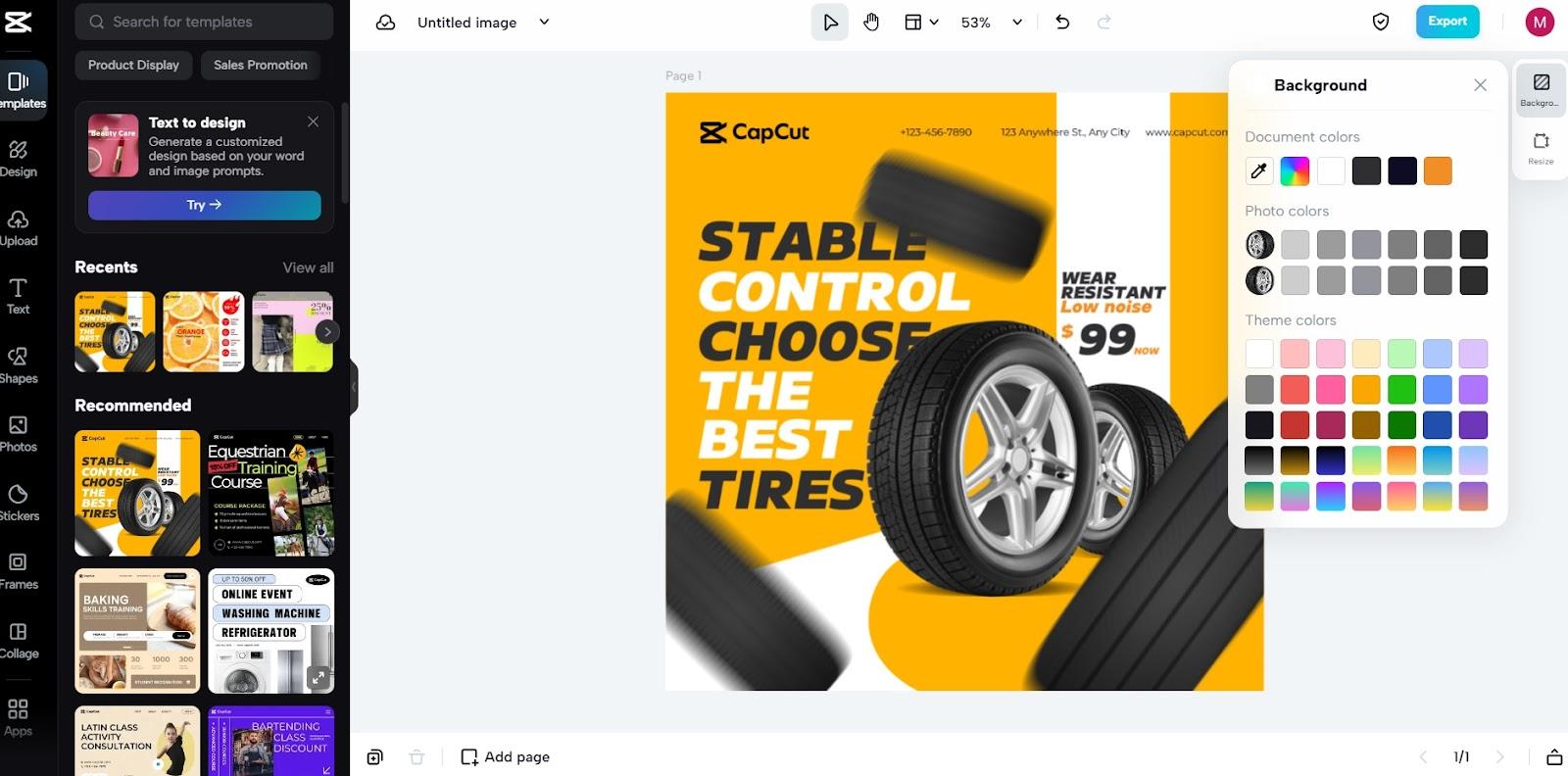
- Create Videos That Instantly Go Viral
This incredible video editor comes with lots of AI functions to create videos that go viral overnight. For example, it helps you create captions through a click auto-captions generate button. You don’t need to play the whole video several times to listen, copy, and write the captions manually. Although there is an option to write manual captions as well, take benefit of its auto-generated captions. Similarly, it allows you to add text effects and other filters and transitions to your videos.
There are also audio/music-adding options to uplift the engagement of the audience in your videos. Moreover, you can also trim your videos, crop them, resize them, or compress them with a free video compressor here.
- Incredible Photo Editing
Similarly, this editor also comes up with the most innovative photo editor that you can use to make edits. It is empowered with all the AI tools that are powerful enough to edit photos with a professional touch. For example, one of its most surprising features is to change or remove the background of your photo with one click. Yes! You just click on the background remove and the AI algorithms will do it for you. No complex steps are involved here but everything is simple and AI-based. It also supports using frames, shapes, filters, color optimization, themes, and much more.
- Personal & Commercial Templates
At the same time, here you will find a great number of inspiring templates for both personal and commercial use. The top hit content creators take benefit of these templates and use them in their work. Most of the time, they simply take a template and edit it using their photos, text, or videos for a professional impact. No matter which template you choose, these are all free and would never require any payment.
- Simplified Workflow
Content creators do not spend hours and nights over a single photo or video to make it go viral. As their job is to create content and they have tons of stuff to post daily, they use AI-based editors. For example, they use this Creative Suite to bring effectiveness and efficiency to their work which saves their time. Not only time, but the automation of editing processes through AI tools also helps them relieve their unnecessary stress.
- Team Collaboration
Similarly, team collaboration is another beneficial aspect of this editor. Content creators stay in close collaboration with each other as well as with brands. They produce content for them and also take a keen eye on the content of their competitors. For this purpose, they use this team collaboration feature to connect and share their work with others. For example, they use it to connect to a brand to share what they have made for their product marketing or so.
- Cloud Backup
As content creators have tons of stuff to edit, post, and save daily, they take benefit of cloud backup. This incredible online editor comes with the most interactive cloud space where you can easily save all your files. Then, you can also access, open, edit, or share them whenever you need. Hence, it greatly benefits content creators as they can easily access all their content through this online space from any location.
- Saves Money
Another real-life fact is that content creators are the ones who always look for ways to save money. They create viral content to get more profits every day but when it comes to costs, they are smart people. They don’t use paid editors but use Creative Suite which is not only free but also contains all premium functions.
- Watermark Free Downloads
Finally, all of these downloads from this Suite are free from any watermarks or logos on them. This is another plus point for the content creators as they prefer to take all the credit for themselves. They don’t like to tell others that they use editors to create engaging content. Rather, they take all credit themselves as there is no editor watermarks on their content.
How to Use CapCut Creative Suite?
Do you want to use this super interactive Creative Suite just like top content creators do? Let’s follow the steps here and create viral content yourself!
- Step 1: Signup
Go to the Google site. Then, click on the search box and write CapCut Creative Suite. It will appear in the top search results. Click on it and then create your free account through free signup. After that, verify your account and log in.
- Step 2: Upload
Go to the editor, either online photo editor or online video editor based on whatever you want to edit. Then use the upload button to drag your photo to this editor’s space. You may also pick any photo or video from the editor’s sample collections. There are many free-to-use photos and videos to make people test the features of this editor.
- Step 3: Edit
After opening the photo/video on the editor, use the tools on your right and left screen panels for editing. If you think that you need to change the background on your photo, there is a button to remove it. Similarly, you can also add the near background, filters, frames, stickers, and much more. For video editing, you will find all the premium and professional tools here to make your videos go viral.

- Step 4: Download
After completing all the edits, click on the download button under the export section. Your content will be saved to your device without any editor’s watermark on it.
Conclusion
Just like content creators, you can also create viral and winning content using this incredible Creative Suite. For this, you don’t need to have any particular editing skills.
Rather, take benefit of its AI tools and create the most artistic changes to your photos and videos. Share them with your friends, family, and other people and surprise them through these artistic masterpieces.
